Manage the community

Online management for homeowners associations.

Onzane brings together bookings, requests, facilities, properties and usage rules so residents, boards, employees and managers work with the same information.

See how management works

A complete process

From setting a rule
to completing a request.

Every request keeps its context. The community defines how it works, residents act from the app and the people responsible supervise the outcome from the panel.

  1. 01 Configure

    Define facilities, schedules, rules, permissions, costs and owners according to the community’s needs.

  2. 02 Request or book

    Residents find the available service and complete it from the app without depending on office hours.

  3. 03 Validate and connect

    Onzane applies rules, payments, capacity, deposits or permissions and connects the process to access and notifications.

  4. 04 Supervise

    The board, staff or manager checks statuses, intervenes when needed and keeps the audit trail.

01 Shared spaces

Each facility works with its own rules.

Rooms, pools, courts, barbecue areas or children’s spaces can use different schedules, slots, capacities and conditions. The panel configures operations and the app only shows what each resident can book.

  • Schedules and seasons for each facility
  • Slots, capacities and bookable resources
  • Rules per property and advance-booking periods
  • Blocks, waiting lists and pre-bookings
  • Payments, deposits and optional services
See all booking features
Facility schedule configuration in the Onzane panel
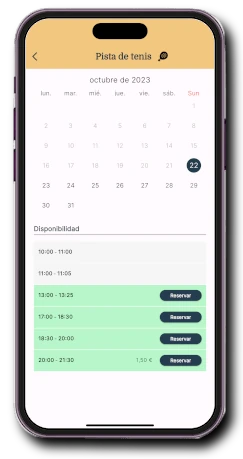
Facility availability in the Onzane app
01Configured in the panel and booked in the app
02 A complete use case

Book padel without races, sheets or messages.

Padel courts combine many Onzane capabilities: fair allocation, slot opening, pricing, cancellations, lighting and access tied to a booking.

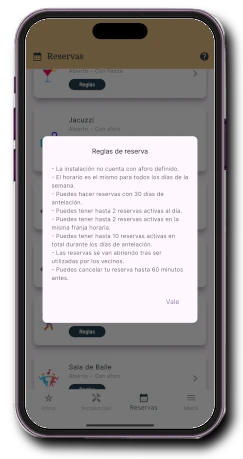
  • Daily and advance-period limits
  • Several courts linked together
  • Automatic alerts when a slot is cancelled
  • Charges for lighting, guests or other services
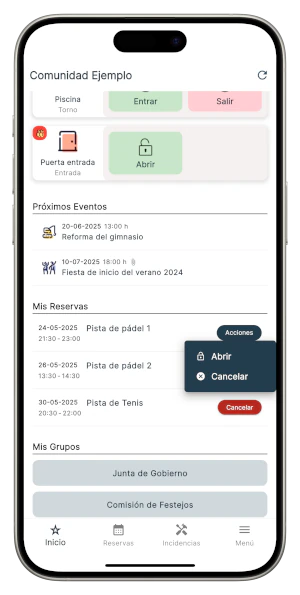
  • Door opening only with a valid booking
See padel bookings
Sports booking details in the Onzane panel
Padel booking rules in the Onzane app
02Clear rules for residents and control for the community
03 Always-open office

A digital request can start at any time.

The community can turn analogue procedures into services available in the app, with the right information, recipients and a status residents can check.

  • Certificate or permit requests
  • Resident data updates
  • Delegations and authorisations
  • Lost property and internal enquiries
  • Custom forms and procedures
Digital services available to community residents
03Requests available around the clock in the app
04 Traceable management

The community knows what has been requested and what remains.

The president, board, in-house staff or property manager can supervise activity and act on bookings and requests without losing history when responsible people change.

  • Central view of requests and bookings
  • Statuses, dates and responsible people
  • Data linked to properties and residents
  • Manual intervention when needed
  • Information that remains with the community
Centralised community management with Onzane
04A shared view for everyone who manages
Opening a facility from a booking in the Onzane app

More than a calendar

A booking can activate
the rest of the community.

A booking does not have to end with confirmation. It can charge for a service, notify staff, grant access or switch on a device during the authorised time.

  • Access linked to a valid booking
  • Payments and deposits connected to the process
  • Alerts for residents and staff
  • Maintenance blocks
  • Usage records and traceability

One process, several experiences

Everyone acts
within their role.

The app and panel show the right actions for each profile, while everyone updates the same process.

01

Residents

Book, pay, check rules and submit requests from the Onzane app.

02

President and board

Set criteria, supervise activity and keep control of the community.

03

Managers

Configure facilities, properties, permissions and processes from the panel.

04

Employees

Check bookings and act for residents when operations require it.

Frequently asked questions

Online management for
homeowners associations.

Answers about bookings, rules, payments, requests and control with Onzane.

01Which shared spaces can be booked with Onzane?

Any facility that needs a calendar or usage control: sports courts, pools, social rooms, children’s areas, barbecues, gourmet rooms or individual resources inside a space.

02Do booking rules apply per resident or per property?

Rules can apply to the property even when several residents use the app. This respects community limits per home and prevents multiple users from multiplying available bookings.

03Can bookings, services or deposits be charged?

Yes. A slot can have a price, deposit or optional services. Payments connect to the wallet and the payment methods enabled by the community.

04Is Onzane only for bookings?

No. Communities can digitise certificate requests, permits, data changes, authorisations and custom procedures, and connect them with documents, notices or tasks.

05Can our current property manager use it?

Yes. Onzane can be contracted by the community and used jointly by the board, in-house staff and its current property manager without changing provider.

06Can a facility open only during a valid booking?

Yes. Onzane can integrate with locks and devices to grant access only to authorised people within the time of a valid booking.

Start with one specific process

Turn a repetitive task
into a clear process.

We help configure the facilities, rules and requests your community needs and launch them with residents and managers.

Talk to us