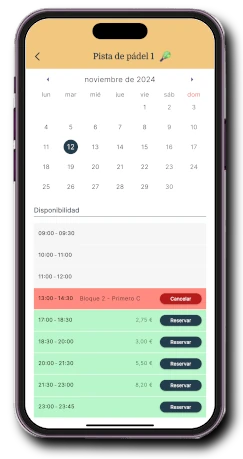
01
Each day and time slot can be different
You can have different schedules and time slots for each day of the week.
Padel Booking App
With Onzane you can manage community padel court bookings: time slots, usage rules, limits per property, payments, deposits, cancellations and automatic access opening when there is an active booking.
A complete booking
With Onzane you can manage community padel court bookings: time slots, usage rules, limits per property, payments, deposits, cancellations and automatic access opening when there is an active booking.
You can have different schedules and time slots for each day of the week.
Set maximum bookings per day and in advance, maximum bookings per time slot, and allow booking of the current slot.
Set a usage fee, a deposit, and a fee for extra services. The usage and service fees can vary by time slot.
Automate court access only for people with a booking. Prevent access by unauthorised persons and control misuse.
Define the padel schedule as you wish
You can have different schedules and time slots for each day of the week.
In the Onzane app
Time slots, property rules, payments and automated access for community padel courts
You can have different schedules and time slots for each day of the week.
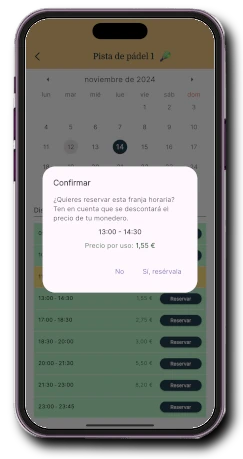
Set a usage fee, a deposit, and a fee for extra services. The usage and service fees can vary by time slot.
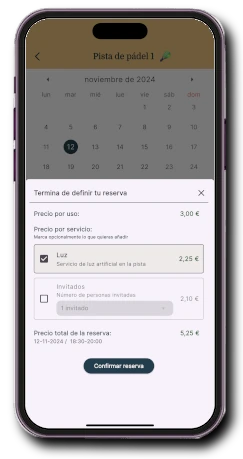
With extra services, you can charge for court lighting or for external padel players.
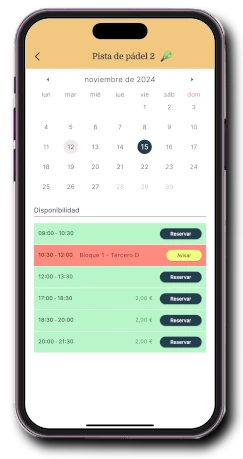
Interested residents receive instant push notifications when padel bookings are cancelled.
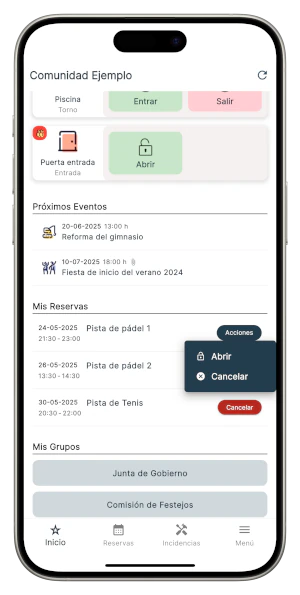
Integration with electric locks
Automate court access only for people with a booking. Prevent access by unauthorised persons and control misuse.
More than availability
Each community activates only the capabilities it needs and can expand operations without changing systems.
For maintenance, works, or any other reason, you can block the court to prevent bookings. The closure can be for whole days or by the hour.
Choose a fixed time for each court, so its bookings open at a set hour. Or decide that bookings open as they are consumed, allowing residents to use the court if it is not booked regardless of the booking rules.
Set booking rules that cover all courts. For example, a maximum booking per day across any of the courts.
A booking step by step
With Onzane you can manage community padel court bookings: time slots, usage rules, limits per property, payments, deposits, cancellations and automatic access opening when there is an active booking.
Questions about padel court bookings
Answers about properties, spaces, capacity, payments, rules and booking-linked access.
Yes, normally in a homeowners' association booking permission is granted per property, not per individual resident. So, even if different people live in a property and use the app, padel bookings are managed per household according to the defined limits.
Yes, it is possible, and you can choose whether to display it. If enabled, the name of the property that made the booking appears on the calendar.
The app already includes various configuration options such as maximum bookings per day, advance booking days, maximum bookings within the advance period, maximum bookings per time slot, etc. If you need something different, we can add more options.
Yes, you can revoke booking permission for a property in the Community, so none of its residents with app access can book the padel court.
Yes. You can configure different schedules and time slots by day, slot duration, seasons and specific rules for weekends or other periods of the year.
Yes. Booking rules are applied per property: daily limits, maximum advance booking, bookings per slot, blocks and permissions to keep usage fair between residents.
Yes. You can charge bookings, extra services or deposits through wallet or card payment and connect the booking with electric locks to allow automatic opening only for users with an active booking.
Bookings adapted to your community
We help configure each facility and support residents and managers during rollout.