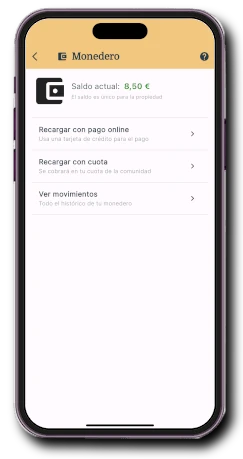
01
Property wallet
Check the available balance before booking or paying for a service.
Community payments
Residents pay for bookings, deposits, fees and services in the Onzane app. Every operation is linked to a property, a concept and a transaction that management can review.
A payment with context
The operation starts with a real community need and ends with an identifiable transaction for both residents and managers.
The community sets what is charged, the amount and the properties it applies to.
The resident uses their balance, tops up by card or requests a charge to the next fee if enabled.
The app shows the concept and amount before completing payment.
The payment remains in the property history and can be reviewed in the panel.
Control from the panel
Payment methods do not have to be the same for every property. Management configures their scope and reviews operations in the management panel.
Onzane app
Balance, top-ups and transactions remain within the process that created the payment.
Check the available balance before booking or paying for a service.
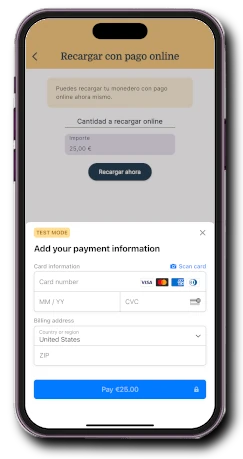
Add the required amount with a debit or credit card.
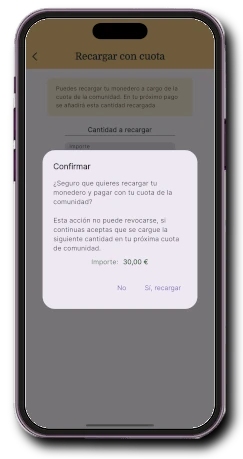
Request that the top-up be added to the next fee when enabled.
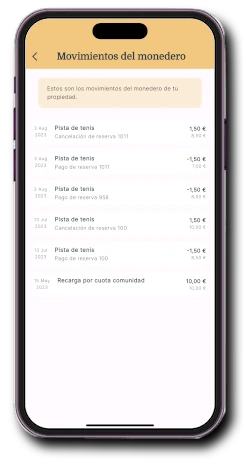
Review top-ups, payments, refunds and adjustments for the property.
Shared balance, clear transactions
People linked to the same home share its available balance. The history explains how it was topped up and used without mixing it with other properties.
Payments tied to community life
Payment is built into the process that needs it, rather than becoming an isolated transfer that must be identified later.
Charge for a court, room or other facility and return the relevant amount after cancellation according to its rules.
Collect community concepts while identifying the property and reason for payment.
Staff can generate a QR code so the resident confirms a product or service charge on their phone.
Real process
The demo shows how a resident adds balance to the property wallet with a bank card.
Before enabling payments
Answers about balances, cards, fees and transaction management.
The community can enable bookings, deposits, fees, assessments, products and other services. The concept and amount are shown before confirmation.
Currently available payments use the property wallet. It can be topped up only by the amount needed before the operation.
Yes. The wallet belongs to the property, so people linked to the same home can use it according to their permissions.
A compatible gateway in the community’s name is required for card top-ups. Onzane currently integrates with Stripe.
It reaches the account configured by the community with its payment provider. The net amount depends on that provider’s fees.
Yes. Top-up methods can be enabled or disabled by property, including restrictions when debt exists.
Onzane can return the relevant amount to the wallet according to the cancellation rules configured for the facility.
Yes. The panel provides top-up and transaction information for incorporation into the community’s accounting process.
Connected payments
We configure payment methods, property rules and the right journey for residents and managers.