01
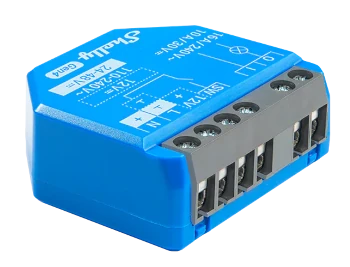
Shelly 1 Gen4
A compact format for operating one point when the panel and installation support a local integration.
Access equipment and technologies
Onzane takes digital permissions all the way to the physical installation. Smart relays, readers and cameras connect the platform to pedestrian doors, garages, barriers, turnstiles and shared facilities.
From permission to opening
Every access point is assessed as a whole: the existing door or barrier, the equipment that operates it, available connectivity and the rules defined in Onzane.
Identify the lock, motor, electrical panel, opening signal, connectivity and actual use of the point.
Select the relay, reader, camera or combination suited to the installation and its required level of control.
The device receives an instruction or supplies the identification the platform needs to validate access.
Onzane checks permissions, schedules and validity before authorising and recording the action.
Onzane + Shelly
Onzane currently integrates with Shelly equipment. Its relays carry a digital instruction to the opening contact of a door, barrier, motor or turnstile without turning the platform into a closed system tied to one access type.

A compact format for operating one point when the panel and installation support a local integration.
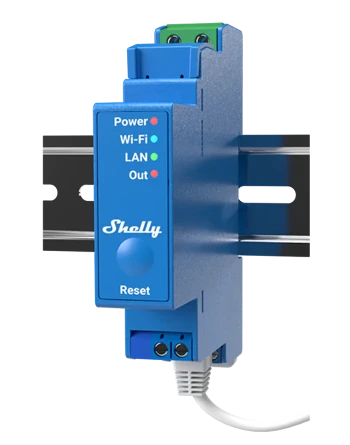
Professional single-channel DIN-rail equipment for panels where a tidy, maintainable installation is required.
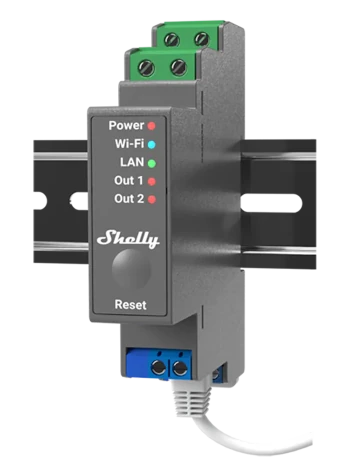
Two controllable channels in one unit for projects with two related operations or access points.
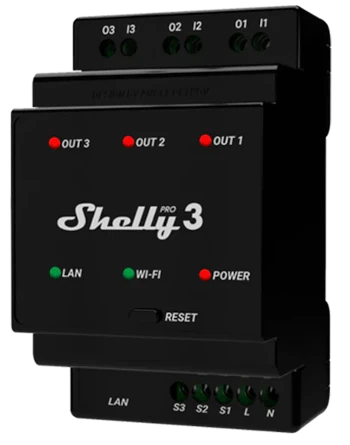
Three channels for centralising several compatible operations in the same control panel.
Model selection depends on the electrical panel, voltage, signal type and required operation. Every installation must be assessed before specifying the equipment.
One installation can combine several layers
Onzane integrates Shelly relays and locks from Nuki, IOPark and Watchman Door. They can be combined with readers and cameras to identify people or vehicles. Selection depends on the model, installation and compatibility of each connection.
Shelly relays trigger the opening signal of existing equipment. Compatible locks from Nuki, IOPark and Watchman Door also connect the locking mechanism itself to Onzane’s access management.
They identify compatible cards, key fobs, wristbands or other credentials and link them to a person or valid permission.
A registration point with a compatible reader and credentials lets residents register their keys from the app. This reader is dedicated exclusively to registration and does not operate any door.
Explore RFID key self-registrationThey identify a plate as a vehicle approaches the garage so Onzane can check its authorisation before ordering the opening.
Deployment on real infrastructure
The result depends on how it integrates with the existing access point. The project therefore starts with a technical assessment and ends with operating and permission-revocation tests.
Hardware with a specific role
This page explains physical infrastructure. Authorisations and use cases have their own space so each decision remains precise.
Onzane defines scope, schedule, validity and revocation; the device only carries out an instruction that has already been validated.
See permissionsCamera, RFID tag and resident-managed plate operations are covered in the parking context.
See garagesCapacity, passes, guests and validation by turnstile or staff follow specific rules.
See poolsFrequently asked questions
Answers about Shelly, relays, readers, cameras, installation and reuse of existing equipment.
Onzane integrates Shelly relays and locks from Nuki, IOPark and Watchman Door. It also integrates with Hikvision and Dahua number plate recognition cameras. The solution depends on the access point and the technical compatibility of each model.
Compatibility should not be assumed for a manufacturer’s entire catalogue. Before selecting equipment, we check the model, connectivity, installation and functions available through its integration with Onzane.
It bridges the instruction authorised by Onzane and the opening signal accepted by a door, lock, barrier, turnstile or motor. It does not replace the physical mechanism by itself.
Often yes, provided it has a compatible actuation input and the installation meets the technical requirements. Each access point must be checked before an integration is proposed.
Yes, within a compatible project. The reader identifies the credential and that information must reach Onzane through a validated connection so the corresponding permission can be applied.
Their role as an identification technology is described here. Vehicle, plate, parking-space and parking-permission management is covered on the dedicated garages page.
Installation must be carried out by a professional suited to the panel, lock, motor and device involved. The plan should include electrical safety, contingency and operating tests.
Yes. A community can use different media for each access point while keeping the rules centralised in Onzane, provided the technical compatibility of every connection has been validated.
Self-registration requires credentials and a reader compatible with the installation. It lets you reuse compatible existing RFID keys, but does not mean that every tag or manufacturer can be used.
No. It is dedicated exclusively to registering keys. Its role is different from that of readers controlling a door.
The access point first. The equipment second.
We review doors, panels, motors, readers, cameras and connectivity to define what each point needs and how to connect it to Onzane.