 Cristina Romero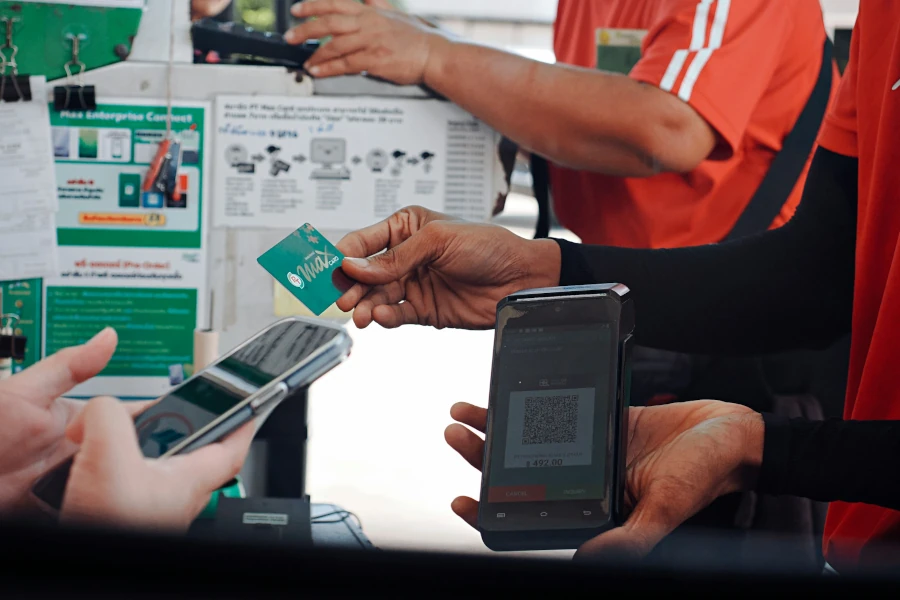
How to pay for goods and services in a residents’ association using a QR code
In many residents’ associations, there are small or medium-sized charges that remain quite a hassle to manage. We’re not just talking about the association fee or a special levy, but those much more day-to-day, face-to-face payments that arise when the association offers services, activities or products to its own residents.
This could be the hire of a communal vehicle, a themed activity organised within the estate, a family event, the sale of drinks and snacks in a communal area, or any other one-off service that a community employee collects payment for in person from a resident. And that’s where the same old problem usually arises: how to collect that payment simply, quickly and efficiently, without relying on cash, without manual note-taking and without turning a small matter into a faff.
This is where a very practical feature of Onzane comes in: QR code payments from the virtual wallet. Thanks to this system, an employee can generate a payment QR code from Onzane Staff and the resident can pay instantly via the Onzane app, using the balance in their wallet.
The result is a system that fits seamlessly into the day-to-day life of a community: the staff member requests the amount, the app generates the QR code, the resident scans it using the ‘Pay with QR’ option in their wallet, confirms the payment and, if they have sufficient balance, the charge is processed instantly. At that very moment, the staff member receives confirmation that the payment has been successfully completed.
Put another way: the community can collect payments for services or products in person using QR codes, but without the need for cash, without resorting to makeshift systems, and by taking advantage of Onzane’s payment ecosystem. And this opens up a whole host of possibilities for communities that want to professionalise small, day-to-day collections without any hassle.
The real problem with in-person payments in a community
Many communities have historically managed these payments ‘as best they could’. In some, cash is used. In others, a note is taken to collect later. In others, bank transfers or Bizum are used outside the community’s normal workflow. And although all of this may work on an ad hoc basis, the reality is that it creates quite a bit of friction when the process becomes repetitive.
Because when an employee has to collect a payment in person, the community needs that process to be quick, clear and easy to verify. If it isn’t, problems arise: amounts recorded incorrectly, residents claiming they’ve already paid, payments being deferred, payments that are difficult to reconcile, or situations where the staff member has to act as a collector using tools not designed for that purpose.
This happens more often than it seems in communities with an active internal life. And the more in-person services the community offers, the more sense it makes to have a specific solution.
Not everything is done via online bookings or direct debits
Onzane already offers a full suite of payment options via the app for bookings, fees, special levies and other common uses. But there is a different need that many communities also have: in-person payments.
That is, situations where there is direct interaction between a staff member and a resident. A clear example would be a staff member providing a service, organising an activity or selling a product on the spot. What is needed here is not just a general payment gateway, but a very quick way to initiate payment in person.
And that is precisely what the QR code generated from Onzane Staff solves.
Onzane’s solution: generate a payment QR code from Onzane Staff and pay via the virtual wallet
The logic of the system is very simple. The employee opens the payment function in Onzane Staff, enters the amount they wish to collect and, if necessary, adds an optional note to better identify the payment reference. From there, the app generates a QR code which is displayed on the employee’s device.
The resident, for their part, opens the Onzane app, accesses their virtual wallet and taps the ‘Pay with QR’ option. From there, they scan the code shown to them by the employee; the app displays the amount to be paid and allows them to confirm the payment, provided they have sufficient balance in their wallet.
Once confirmed, the amount is deducted from the resident’s wallet and, at the same time, the employee sees a clear confirmation in their app that the payment has been made successfully.
It is a very straightforward, quick and useful process for day-to-day use. It does not require the resident to withdraw cash, does not force the employee to record payments manually and does not disrupt the platform’s overall workflow.
Step 1: the employee requests payment
The starting point is always the staff member. From Onzane Staff, they can initiate the charge at the very moment the service is provided or the product is delivered. They simply need to enter the amount and, if they wish, add a note to better identify the reason for the charge.
This is particularly useful because it makes the employee the controlled source of the payment. There is no paperwork, no amounts remembered from memory, and no need for “I’ll send it to you later”. The charge is generated correctly from within the community’s own operations.
Step 2: the app generates a QR code
With that amount, the app creates a QR code ready to be displayed. This QR code acts as a bridge between the employee’s device and the resident’s digital wallet. It is quick, visual and very easy to use in a face-to-face situation.
And here lies one of the system’s major advantages: the employee doesn’t have to do anything other than show the QR code. They don’t need a POS terminal, they don’t need to send a link and they don’t need to exchange any extra details with the resident. The payment is already set up.
Step 3: the resident opens their wallet and taps “Pay with QR”
From the Onzane app, the resident accesses their virtual wallet, a feature already used for various payments within the community. There, they tap the ‘Pay with QR’ option and scan the code displayed on the employee’s mobile.
This step is very important from a user experience perspective, as it keeps the entire payment process within the resident’s familiar environment. It does not force them to leave the app, does not send them to external processes, and does not require them to learn a new procedure each time.
Step 4: Confirmation of the amount and payment
After scanning the QR code, the app shows the resident the details of the amount they are about to pay. If they have sufficient balance in their wallet, they can confirm the transaction straight away.
This provides clarity and security. The resident knows exactly how much they are going to pay before confirming anything. There are no hidden charges or ambiguous steps. The process is straightforward: view amount, confirm and pay.
Step 5: immediate confirmation for the employee
Once the payment has been made, the system deducts the amount from the resident’s wallet and Onzane Staff displays the corresponding confirmation to the employee. This way, the person collecting the payment knows instantly that the transaction has been completed successfully.
This detail may seem small, but it is key. The employee does not have to wonder whether the resident has already paid or whether they need to check later. Confirmation is immediate.
What can a residents’ association collect using this QR payment system
One of the best things about this feature is that it isn’t limited to a single use case. In fact, it works for almost any situation where the community needs to collect a payment in person from a resident.
Community vehicle hire
Some communities have vehicles for internal, temporary or shared use. These may be small support vehicles, mobility solutions or items that residents can hire for a specific purpose. In such cases, the staff member can generate the hire charge and the resident can pay it instantly via QR code.
This avoids having to handle cash or leave the payment pending for a later date. What’s more, it makes the rental process quicker and easier to manage.
Themed activities and community events
Another clear example is activities organised by the community. Workshops, family events, themed parties, one-off events or special activities within the estate. When these activities incur a cost, QR code payments provide an excellent solution for the operational side.
The staff member or manager can collect payment at the time of registration, entry or during the activity. The resident pays via their app and the community manages the process within its own system.
This works particularly well in communities that already use online booking for facilities and services and wish to extend this digitalisation to in-person payments as well.
Sale of drinks and snacks
This is probably one of the easiest examples to understand. In some communities, particularly in summer or in facilities with a lively social scene, drinks, snacks or other fast-moving consumer goods are sold. These are small, frequent transactions that are a real hassle to manage if everything relies on cash or handwritten notes.
With QR codes and a virtual wallet, staff can process payments in seconds. Residents don’t need to carry cash, and the community streamlines a process that used to be quite informal.
One-off services within the community
It can also be used to collect payments for specific services that the community offers in person to its residents. The interesting thing is that the functionality does not require the payment to be tied to a single, fixed category. It is designed precisely to meet real and varied day-to-day needs.
That is why this system makes so much sense within a well-designed digital community: because it not only handles large-scale processes, but also small operational payments that were previously left out of the system.
Why this system is better than collecting cash, keeping a record or improvising
The improvement isn’t just that payment is made via mobile. The improvement is that the entire process becomes much smoother.
The employee enters the amount before generating the QR code. This avoids doubts, misunderstandings or ambiguous charges. The resident also sees that amount before confirming. The whole process becomes clearer.
The payment is validated instantly. There is no need to wait to check anything afterwards. When the resident confirms, the employee immediately sees whether the payment has gone through correctly. This streamlines any face-to-face interaction considerably.
Many residents’ associations want to move away from cash as much as possible. Not because it’s fashionable, but for practical reasons. Cash requires balancing the till, safeguarding money and taking on more manual work. A QR payment system in residents’ associations reduces precisely that friction.
When the payment goes through the virtual wallet, it ceases to be a simple informal exchange. It becomes part of a much more sensible system of transactions and control, with traceability. And that helps both the community and the resident.
This same logic is already evident in other uses of the wallet, as we explained regarding payments for padel bookings or the digitisation of small service charges.
The virtual wallet is the piece that makes everything work smoothly
Behind this functionality lies a very powerful idea: residents already have a virtual wallet within their app. And that wallet isn’t just for one thing. It’s used for various payments within the community: bookings, fees, special levies and any other payment needs the community wishes to manage via the platform.
This means that QR code payments are not a stand-alone feature, but a natural extension of a wider system. Residents are not paying ‘outside’ the system, but using the balance they already manage within their digital relationship with the community.
Residents can top up their balance
Depending on the community’s settings, the wallet can be topped up by card, and top-ups can also be charged to the community fee. This makes the experience much more convenient for residents, as they do not need to set up each payment from scratch.
They simply maintain a balance in their wallet and then use it when needed. It is this mechanism that makes in-person payments truly streamlined.
Residents can check their transaction history
Another important point is that the wallet fits in with a system of transaction history and traceability. The user isn’t paying blindly. They can better check what they’re doing and how they’re using their balance. And the community, in turn, can manage top-ups and payments more efficiently.
That is why this feature integrates so well with the app’s overall payment system.
What residents gain when paying via QR code within the community
From the resident’s perspective, the improvement is very clear.
- They don’t need cash; they can pay on the spot without carrying money around. This is particularly convenient in communal areas, leisure activities, the swimming pool or internal events, where people often don’t go with the intention of making a traditional payment.
- Everything happens within the Onzane app; there’s no need to switch to other tools or resort to external methods. Residents use the same app they already use to manage other aspects of their community.
- Residents see the amount before confirming, which provides peace of mind. There are no hidden payments or charges that need to be checked later. The transaction is confirmed consciously, with the amount clearly displayed.
- The experience is quick; scanning and confirming takes very little time. This means that in-person collection ceases to be a hassle and becomes a truly usable process.
What the employee gains and what the community gains
The community and its staff also benefit greatly.
- Collection is more efficient; the employee doesn’t have to handle cash, chase up outstanding payments or rely on handwritten notes. They initiate the payment, show the QR code and receive confirmation.
- The community professionalises small payments. Many of the payments that cause the most disorganisation aren’t large sums, but small, recurring payments. That’s precisely why it’s worth getting them right.
- It brings administrative order. When in-person payments also go through Onzane, the community no longer has payments ‘outside the system’. And that fits much better with modern, centralised management.
A very useful system for communities with staff and an active community life
Not all communities have the same needs. But for those that have staff and offer services, activities or products to their residents, this feature makes a great deal of sense.
It fits particularly well in communities where there is already a certain level of on-site operations: concierge services, support staff, organisation of activities, internal events, active communal areas or small services provided on the spot.
It also reinforces the role of Onzane Staff as a dedicated app for community staff. It’s not just about incidents, parcel deliveries or rounds. It’s also about giving staff practical tools to handle real day-to-day tasks, such as correctly charging a resident during a face-to-face interaction.
Very specific examples of day-to-day use
Imagine a community organising a children’s activity on a Saturday afternoon. An employee manages entry or participation and charges a small fee for each registration. Instead of handling cash, they process payments via QR codes from Onzane Staff, and each family pays instantly from their digital wallet.
Another example: a community with a social club or swimming pool where an employee sells drinks and snacks at certain times. Payment no longer relies on loose change or keeping a tally of purchases for later. The employee generates the amount, the resident scans the code and pays.
Or consider a community that makes a vehicle or other resource available to residents for occasional hire. The employee manages usage in person and collects payment via QR code on the spot, without disrupting the community’s general payment system.
In all these cases, the pattern is the same: a need for simple, immediate and in-person payment. And that is precisely why QR codes work so well.
Frequently asked questions about paying via QR code in a community
Is it only suitable for large payments?
No. In fact, it makes a great deal of sense precisely for small or medium-sized payments made in person, which are a hassle to manage with cash or handwritten notes.
Can it be used for activities, events or one-off sales?
Yes. It is one of the best uses of this feature. Any in-person payment between staff and residents can fit into this process.
What happens if the resident doesn’t have enough credit?
To confirm the payment, they need to have a balance available in their wallet. If they don’t, they’ll have to top it up using the options enabled by the community.
Does the employee know immediately if the payment has gone through successfully?
Yes. Once the resident confirms the payment, the employee’s app displays the corresponding confirmation.
Does this replace other Onzane payment methods?
No, it doesn’t replace them: it complements them. Onzane already allows payments for other community processes, and this feature adds a very useful solution for in-person payments using QR codes.
Conclusion: this is how a community can collect payments in person, cash-free and with greater control
When a community offers products, activities or services to its residents, sooner or later it needs to sort out the payment side of things. And if that payment is made in person, traditional methods usually start to fall short very quickly.
With Onzane, this process can be carried out much more naturally. The staff member generates the payment via Onzane Staff, enters the amount, adds a note if needed, and the app creates a QR code. The resident opens their virtual wallet within the Onzane app, taps ‘Pay with QR’, scans the code, checks the amount and confirms. If they have sufficient funds, the payment is processed and the staff member receives instant confirmation.
The result is a highly useful system for collecting payments for goods and services within a residents’ association: faster, clearer, more professional and much better suited to the day-to-day operations of associations with staff, activities and in-person services.
In short, if a community wants to move away from cash, handwritten notes and payments that are difficult to trace, this QR payment feature from the Onzane wallet is a very logical solution. Because it turns an in-person payment into a simple, immediate digital process that is perfectly integrated into the community’s daily life.
 01
01
 02
02
 03
03