Community key custody
Key custody for residential communities
Onzane lets you control community key custody: who takes a key, when it is returned, what it is used for and which staff member, concierge or administrator managed each movement.
View Onzane Staff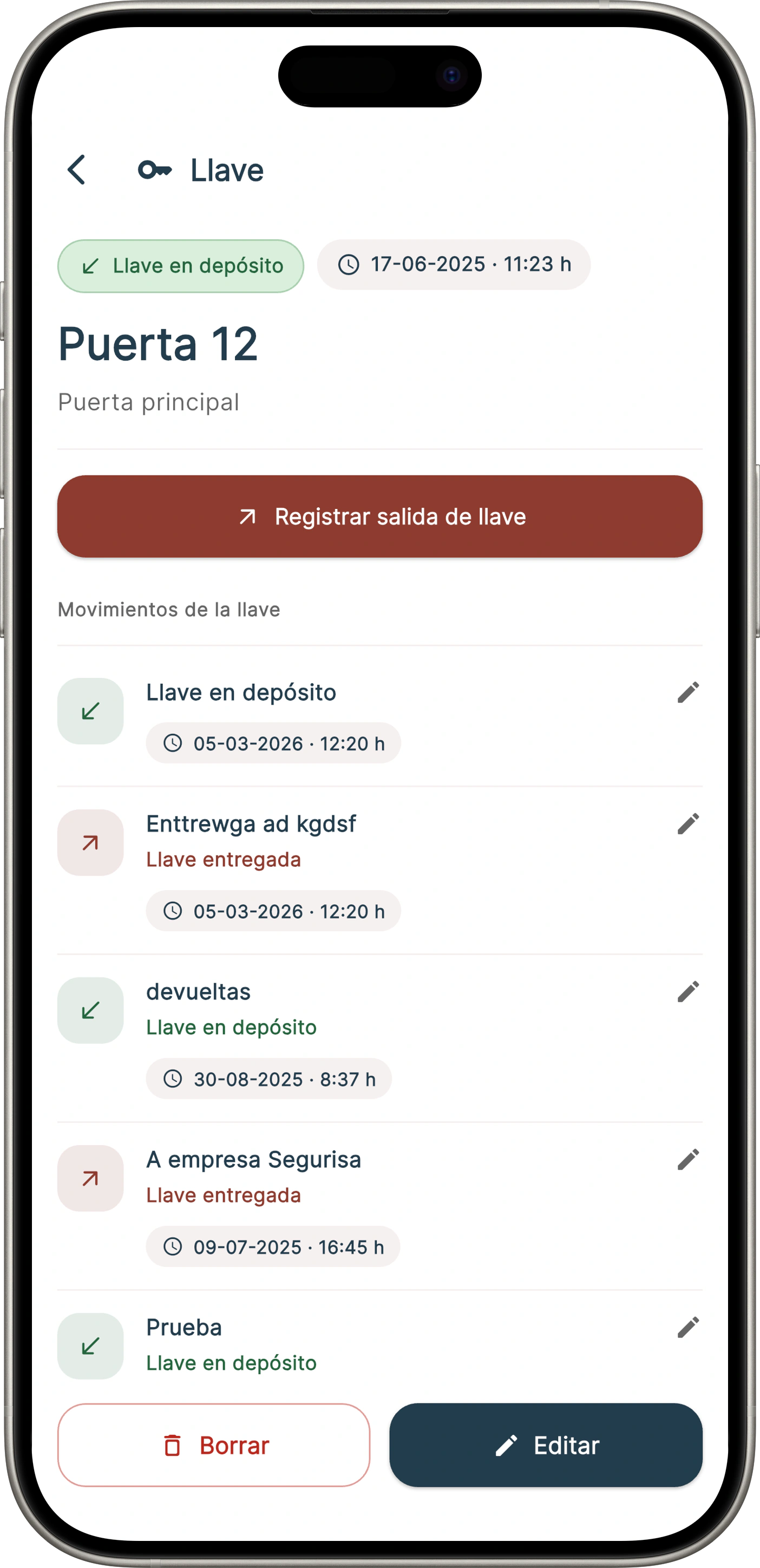
Key custody without notebooks or manual sheets
Community key control needs traceability: which key is handed over, to whom, under what authorization and when it becomes available again.
Handovers and returns
Record every handover and return of keys for homes, technical rooms, garages, rooms, storage areas or shared spaces.
Identified responsible users
Link each movement to a staff member, supplier, resident or authorized third party, with date, reason and internal owner.
Searchable history
Check the history if there are incidents, lost keys, doubts about a handover or a need to justify an action.
Community key custody
Handover, return and history of custody keys
If the community keeps keys for homes, technical rooms or common areas, Onzane helps organize every movement without notebooks, loose sheets or informal messages.
Register custody keys
Identify each key, its location, the property or common area linked to it and who can request or hand it over.
Controlled handover and return
Each movement is linked to a person, a reason, an authorization and an expected or completed return.
History for incidents
The administration or concierge team can review previous movements if there are lost keys, doubts or complaints.
Community key custody
What key custody solves in a community
When a community keeps keys for homes or shared areas, the challenge is not just storing them: authorizations, handovers, returns and responsibilities must be controlled.
Home and resident keys
Keep a record of which keys exist, which home they belong to and when authorized staff have used them.
Shared-area keys
Control keys for rooms, technical areas, garages, pools, storage rooms or restricted shared spaces.
Handovers to suppliers and third parties
Record one-off handovers to maintenance companies, insurance teams, technicians or third parties authorized by the community.
Responsibility and authorization
Each movement is linked to a responsible person, a reason and an expected return to avoid information gaps.
Concierge operations
How key control works
The workflow is designed for concierge teams, staff, administrators and communities that need a quick, searchable record.
Key registration
The key, its location, the access type and the related home or shared area are registered.
Recorded handover
The staff member records who takes the key, why and under which authorization.
Controlled return
The return is recorded to know when the key is available again and who closed the operation.
Searchable history
Administrators and authorized staff can review movements when there are doubts, incidents or losses.
Designed for concierge, maintenance and administrators
Key control is integrated with Onzane Staff, the app for community employees. Staff can record operational tasks from their mobile without manual sheets.
Discover Onzane Staff
Frequently asked questions about key custody
Common questions about organizing key control and custody in a residential community.
You can also combine it with digital access control
If you want to reduce the use of physical keys, Onzane also lets you open doors, garages and common areas from the app or with proximity devices.
View access controlOur newsletter inspires, informs and surprises
Don't miss our step, we are nonconformists